A road shipment travels with three documents that describe the same goods: the commercial invoice, the packing list and the CMR consignment note. Each is made for a different reader, and nothing makes them agree except someone checking. When they don’t, the difference shows up late: at loading, at customs, or when the buyer counts the boxes.
This guide is for whoever ships or receives those goods: the importer, the freight forwarder, the customs broker. It lists the fields the three documents must share, shows on one fictional shipment what a mismatch looks like, and ends with a check you can do by hand. Working with shipment documents, I have seen such mismatches often: most of the time it was the number of packages or the weight that did not agree.
Commercial invoice, packing list and CMR: who writes each, and why
The commercial invoice is the seller’s bill to the buyer: what was sold, how much of it, at what price, the total (often in words too), the Incoterms rule and the contract it rests on. The buyer pays from it, and it is one of the documents behind the customs declaration.
The packing list describes the same goods as they are packed: how many packages of each item, their net and gross weight, their volume. It cites the invoice by number and date. It is the paper in the hand of whoever counts the boxes.
The CMR consignment note is the road carrier’s document under the CMR Convention. It is made out in three originals, signed by the sender and the carrier: the first goes to the sender, the second travels with the goods, the third stays with the carrier (Article 5). Article 6 lists what it must contain, among them the names and addresses of the sender and the consignee, the number of packages with their marks and numbers, the gross weight, and the instructions for customs.
So the seller writes the first two, and the third is the only one the carrier signs.
The fields that must agree
| Field | Invoice | Packing list | CMR | What a mismatch costs |
|---|---|---|---|---|
| Number of packages | if printed | total | total, Art. 6(1)(g) | Presumed to be the count the carrier took over (Art. 9) |
| Gross and net weight | both, if printed | both, totals | gross, Art. 6(1)(h) | The sender is liable (Art. 7) |
| Quantity of each item | each line | each line | — | If customs checks the goods, the declarant pays (Customs Code art. 97) |
| Seller and consignee | seller, consignee | shipper, consignee | sender, consignee | The sender is liable (Art. 7) |
| References | contract (number, date) | invoice (number, date) | invoice and packing list, as attached documents | The carrier need not check them; the sender answers (Art. 11) |
What the CMR Convention says
On taking over the goods, the carrier must check that the number of packages and their marks and numbers are as the CMR states (Article 8). If the carrier enters no reservations, the CMR is presumed to show the right count until the contrary is proved (Article 9). The sender answers to the carrier for wrong particulars, the names, the number of packages and the gross weight among them (Article 7), and for the documents attached for customs, which the carrier need not check (Article 11).
Mismatches and the customs declaration
For goods cleared in Georgia, the Customs Code lets customs examine a registered declaration and its supporting documents, ask for more documents, and examine the goods themselves (art. 96). A registered declaration can be amended on the declarant’s application before the goods are released, but not once customs has announced that it will check the declaration or has found wrong data in it (art. 90). Caught before filing, a mismatch costs a corrected document. Caught by customs, it is no longer yours to correct on your own application.
The articles are quoted for what they say. For what they mean for your shipment, ask a customs broker or a lawyer.
One fictional shipment, checked
The release of the logisticshub skill comes with 29 demo document sets: 7 that agree and 22 with a problem planted in them. I took ka-office-furniture/packages-mismatch: office furniture from Kayseri in Turkey to Tbilisi, with the documents in Georgian. All companies, people and numbers in the demo documents are fictional.
The seller invoices 60 metal office pedestals with three drawers and 40 with two: EUR 13,300.00, FCA Kayseri, in 100 boxes. The packing list agrees: 60 and 40 cartons, 100 in all, 1,680 kg net and 1,880 kg gross. The CMR gives 60 and 30 cartons, 90 in all, and still 1,880 kg.
The set comes with its extraction: every fact of its four PDFs written down with its quote and page, as an agent writes it when it reads them. So the check itself needs no model. From a copy of the repository at v1.0.0:
node skills/logisticshub/scripts/check.mjs \
  fixtures/ka-office-furniture/packages-mismatch/extraction.json --lang en
This is the report it prints, without the list of files it wrote:
# Document check report

**Errors: 1 · Warnings: 0** · Checked: 4 documents, 16 rules

Extraction: no issues

## Errors

### 1. QTY-01 · Quantities and packages

Number of packages differs: invoice 100, packing list 100, CMR 90.

- invoice AOS-INV-2026-0918-01 (invoice.pdf), p. 1 · number of packages: “100 ყუთი”
- packing list AOS-PL-2026-0919-01 (packing-list.pdf), p. 1 · total number of packages: “100”
- CMR CDT-CMR-2026-0919-01 (cmr.pdf), p. 1 · total number of packages: “90”

→ Compare with what was actually loaded: the quantity of each item and the number of packages must be the same on every document.

---
Generated by Logisticshub
The quotes stay in the documents’ language, exactly as printed; only the report around them is in English. Nothing else is reported: by its rules, the names, the references, the dates and the weights agree. Each PDF with a finding also comes back as a marked copy. This is part of the CMR’s goods table:
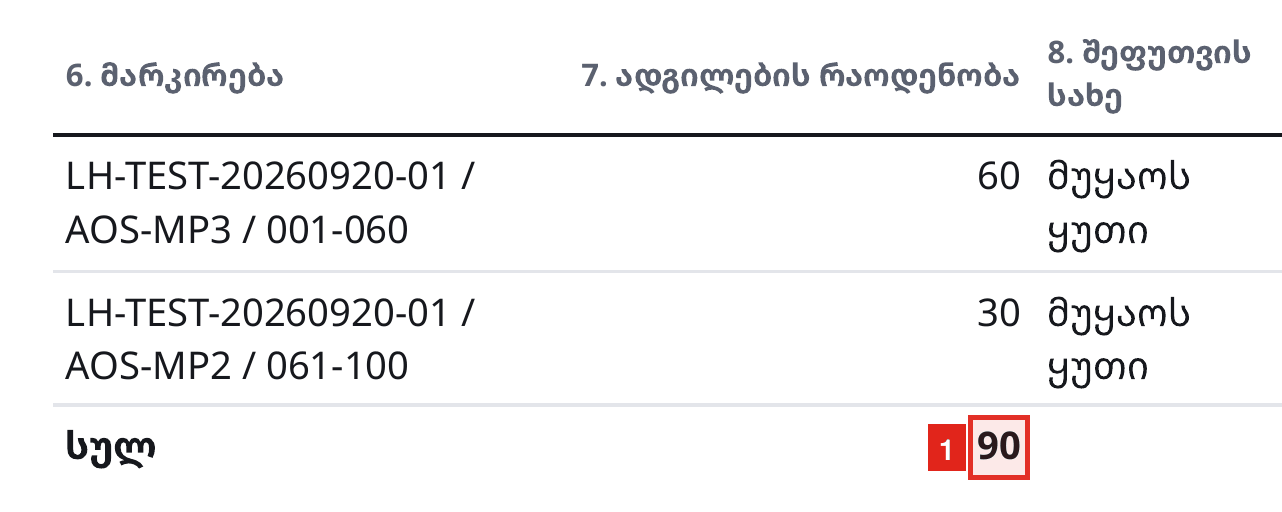
The report stops at the count, and its last line says where to look: the loading. The CMR holds one more clue that no rule reads. The marks on its second line run from 061 to 100: forty box numbers for thirty boxes. Either the count or the marks are wrong, and only whoever loaded the truck can say which.
A ten-minute check by hand
Put the three documents side by side, and then:
- Packages. Find the count on the invoice (if it prints one), the packing list’s total and the CMR’s total. Then add up the CMR’s lines yourself: a total can be right while its lines are not.
- Marks. A range such as 001–060 is a count too. It must equal the packages on its line.
- Weights. The gross weight on the packing list, on the CMR and on the invoice (if printed) must be one number. Net weight: the invoice and the packing list. Gross must not be below net.
- Items. Match the invoice’s lines to the packing list’s by model code, not by line number, and compare the quantities.
- Names. The seller on the invoice is the shipper on the packing list and the sender on the CMR. The consignee is the same on all three.
- References. The packing list cites the invoice’s number and date. The CMR lists the invoice and the packing list among its attached documents. The invoice cites the contract.
- Dates. The contract first, then the invoice, then the day the carrier took over the goods.
A side-by-side read misses two things: the sums inside each document (quantity × price, the subtotal, the amount in words), which want a calculator, and a figure that is the same on all three documents and wrong for the goods.
Where the skill fits, and its limits
Logisticshub is the open-source skill I built for this check (MIT licence). I built it to split the job in two: an agent is good at reading a PDF, while code is better at arithmetic and gives the same answer every time. Your agent (Claude Code, Codex, Cursor and others) reads each PDF and writes down every fact with its exact quote and page. Everything after that is code: the checker makes sure each quote is printed on the page it cites, then applies 16 fixed rules with exact decimal arithmetic, so the same extraction always gives the same report. Its rules QTY-01, WGT-02, PTY-01 and REF-01 check the table above, and the rules reference states each one exactly.
What its own documentation says it does not do:
- One run checks one shipment.
- Origin and HS codes are only recorded: no tariff classification, no duty or tax calculation, no customs declaration.
- Only the parties’ names are compared, not their addresses, tax numbers, signatures or stamps, and not across scripts.
- Volumes are not compared across documents, and no unit is converted.
- A bill of lading, a certificate of origin or an insurance policy is not read.
- It cannot know what was actually loaded, or whether a document is genuine.
Treat what it reports as discrepancies to verify against the originals, not as verdicts. Logisticshub has no server, so nothing is sent to it: your agent reads the documents with its own model.
Where to read more
The skill’s page has the install commands, what it checks in plain words and its full list of limits: /logisticshub.